CPU Functional Units ,ALU,Control Unit,Internal CPU
CPU Functional Units
CPU (Central Processing Unit) computer ka brain hota hai. Ye pura system ka heart aur mind dono hota hai. Computer me jitne bhi kaam hote hain—data ko process karna, instructions ko execute karna, decisions lena, calculations perform karna—ye saare kaam CPU hi karta hai.
Jab tum koi bhi application open karte ho—Chrome, WhatsApp Web, Calculator, Game, Editor, Operating System boot hona—in sab ke peeche CPU hi instructions ko handle karta hai. CPU millions of instructions per second execute karta hai jise hum MIPS (Million Instructions Per Second) kehte hain.
CPU ko proper, fast, aur efficient tarike se kaam karne ke liye iske andar 3 major functional units hoti hain:
CPU ke 3 Main Functional Units
- ALU – Arithmetic Logic Unit (Calculation + Logic)
- Control Unit (CU) (Manager + Controller)
- CPU Buses (Data Transfer Network)
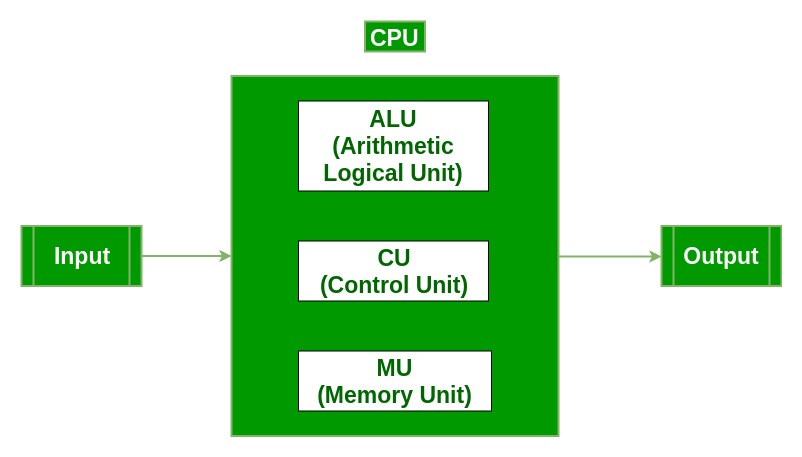
Ye teen units milkar CPU ke andar “Instruction Cycle” complete karte hain:
- Fetch – Memory se instruction lana
- Decode – Instruction ka meaning samajhna
- Execute – ALU, Memory, Register, Bus ko use karna
1. ALU – Arithmetic Logic Unit (Deep Explanation)
Definition: ALU CPU ka wo part hai jo saare mathematical operations aur logical decisions perform karta hai. Jab computer ko kisi number par operation karna hota hai, ya kisi condition ko check karna hota hai—ye kaam ALU karta hai.

ALU kya-kya karta hai? (Super Deep Explanation)
ALU computer ka mathematical aur logical engine hota hai. Ye multiple types ke operations karta hai:
- Arithmetic Operations:
- Addition (जोड़)
- Subtraction (घटाना)
- Multiplication (गुणा)
- Division (भाग)
- Increment / Decrement
- Logical Operations:
- AND
- OR
- NOT
- XOR
- Comparisons (==, !=, <, >, <=, >=)
- Bitwise Operations:
- Bit Shifting
- Bit Rotation
- Bit Masking
- Bit Complement
- Boolean Decision Making:
- IF condition true hai ya false
- Loop continue karna hai ya break
- Temporary Storage:
- ALU output registers me temporarily store hota hai
ALU ke Major Parts
- Arithmetic Unit – Maths operations
- Logic Unit – Condition checking & comparison
- Accumulator Register – Temporary result store karta hai
- Status Flags:
- Zero Flag
- Carry Flag
- Overflow Flag
- Sign Flag
ALU Real-Life Examples
- Calculator me 245 + 57
- Password match check karna
- Game me collision detection
- Sorting algorithm me comparison
2. Control Unit (CU) – CPU ka Manager
Definition: Control Unit CPU ka controller, coordinator, aur brain director hota hai. Ye decide karta hai ki CPU ka kaun part kab aur kaise kaam karega.
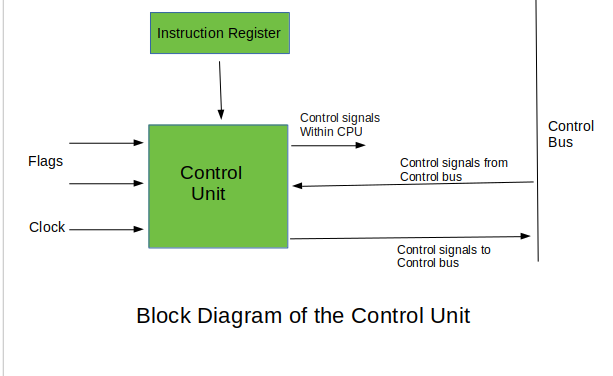
Control Unit kya karta hai? (Deep Explanation)
- 1. Instruction Fetch – Memory se next instruction lana
- 2. Decode – Instruction ka meaning samajhna
- 3. Execute Control – ALU, Register, Memory ko command dena
- 4. Timing Control – Kaun sa step kab perform ho
- 5. Flow Control – Program ke sequence ko control karna
- 6. Data Movement – CPU ke andar data kis direction me jaayega
- 7. Interrupt Handling – Sudden tasks ko manage karna
Control Unit ke Types
- Hardwired Control Unit:
- Fast hoti hai
- Circuit based होती है
- Old CPUs me use hoti thi
- Microprogrammed Control Unit:
- Flexible hoti hai
- Modern CPUs me use hoti hai
- Microinstructions se controlled hoti hai
Real-Life Example
- Principal → teacher & student ko guide karta hai waise hi CU → ALU, Buses, Memory ko guide karta hai.
3. CPU Buses – Communication System
Definition: Buses CPU ke sabhi parts ke beech data & signals transfer karne wali pathways hoti hain. Ye CPU ka communication network hota hai.
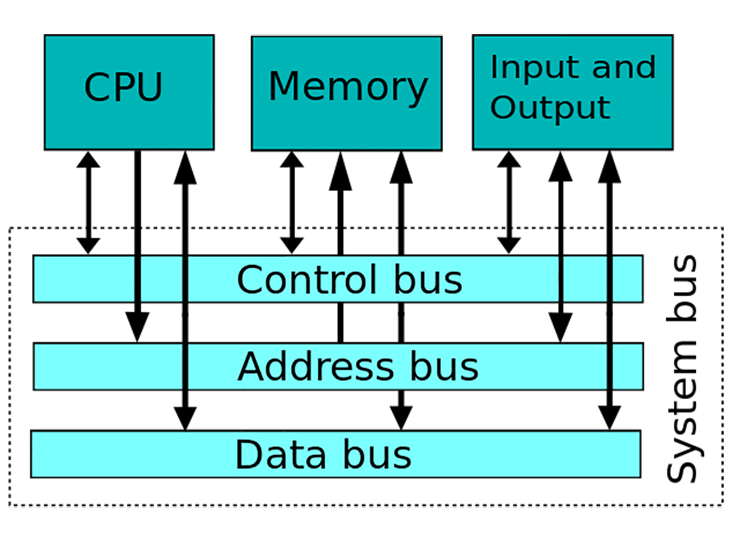
Buses ke 3 Types – Deep Explanation
- 1. Data Bus
- Actual data carry karta hai
- Bi-directional hota hai
- 8-bit, 16-bit, 32-bit, 64-bit hota hai
- 2. Address Bus
- Memory address carry karta hai
- CPU ko batata hai data kahan se lana hai
- Always unidirectional
- 3. Control Bus
- Control signals carry karta hai
- READ signal
- WRITE signal
- Interrupt signal
- Clock signal
Real-Life Example
- School ka notice board – messages sab tak pahunchate hain
Summary Table – Full CPU Functional Units
| Unit | Definition | Key Functions | Practical Example |
|---|---|---|---|
| ALU | Maths + logic operations perform karta hai | +, −, ×, ÷, AND, OR, XOR, Compare | Calculation, Password check |
| CU | CPU ko manage & control karta hai | Fetch, Decode, Execute, Timing Control | School principal jaisa |
| Buses | CPU ke andar communication system | Data, Address, Control signals | Notice board jaisa |
CPU Working Example – Step by Step
- User ne keyboard se 5 + 3 enter kiya
- CU instruction ko fetch karta hai
- CU decode karta hai → “Addition karna hai”
- ALU addition perform karta hai → Result = 8
- Result buses ke through output device tak pahuchta hai


Comments
Post a Comment