CPU Functional Units ,ALU,Control Unit,CPU Buses
CPU Functional Units
CPU (Central Processing Unit) is the brain of a computer. It does most of the important work: processing data, running instructions, making decisions, and performing calculations. Whenever you open an app (Chrome, Calculator, a game, or the operating system), the CPU runs many instructions to make things happen.
The CPU can run millions of instructions every second. To work fast and correctly, the CPU has three main parts called functional units. These units work together to process instructions in a cycle: fetch → decode → execute.
The 3 Main CPU Functional Units
- ALU – Arithmetic Logic Unit (does calculations and logic)
- Control Unit (CU) (manages and coordinates everything)
- CPU Buses (internal networks that move data and signals)
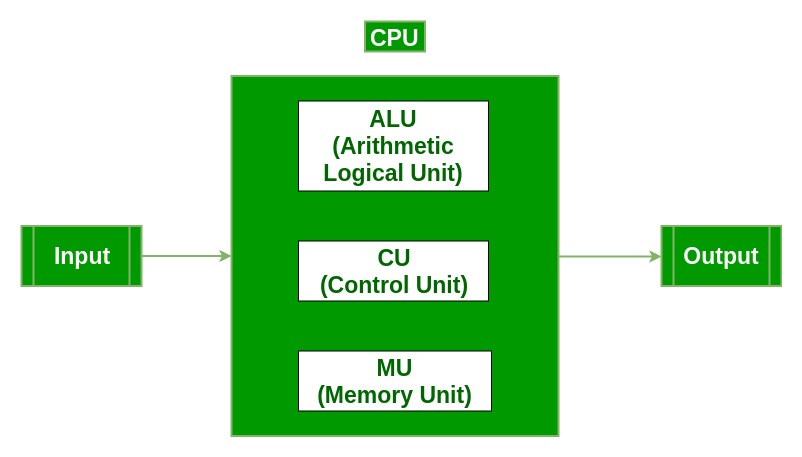
All three units together complete the CPU’s instruction cycle:
- Fetch – Get the instruction from memory
- Decode – Figure out what the instruction means
- Execute – Perform the action using ALU, registers and memory
1. ALU – Arithmetic Logic Unit
What is ALU? The ALU is the part of the CPU that does all number calculations and logical checks. If the computer needs to add, compare, or check a condition, the ALU does it.

What ALU does (detailed)
- Arithmetic operations: addition, subtraction, multiplication, division, increment, decrement.
- Logical operations: AND, OR, NOT, XOR, comparisons (==, !=, <, >, <=, >=).
- Bitwise operations: bit shift, rotate, mask, complement.
- Boolean decisions: checks used in IF statements, loops, and conditions.
- Temporary results: ALU stores results in registers for short-term use.
- Status flags: ALU sets flags like Zero, Carry, Overflow, Sign to show result details.
ALU main parts
- Arithmetic unit – does math calculations.
- Logic unit – does comparisons and logical checks.
- Accumulator – a register that temporarily holds results.
- Status flags – signals that describe the last result (zero, carry, etc.).
Simple examples
- Calculator adding 245 + 57 = 302.
- Checking if a password matches stored value (compare).
- Detecting collisions in a game (logical checks).
- Comparisons used in sorting algorithms.
2. Control Unit (CU)
What is the Control Unit? The Control Unit is the CPU’s manager. It tells all parts of the CPU what to do and when. The CU controls the instruction cycle and coordinates data movement and timing.
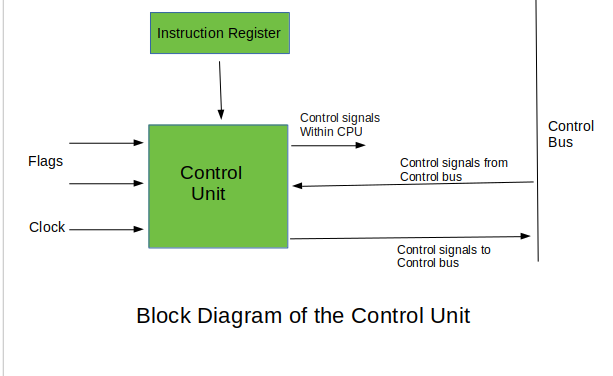
Control Unit tasks (detailed)
- Instruction fetch: read the next instruction from memory.
- Decode: understand what the instruction means.
- Execute control: tell ALU, registers and memory to perform the operation.
- Timing control: make sure operations happen in correct order and timing.
- Flow control: manage program sequence and jumps (which instruction next).
- Data movement: decide where data should move inside the CPU.
- Interrupt handling: temporarily pause and handle urgent tasks (like I/O).
Types of Control Units
- Hardwired CU: fixed circuits, fast, used in older CPUs.
- Microprogrammed CU: uses small programs (microinstructions), flexible, used in modern CPUs.
Simple example
Think of CU as a school principal who tells teachers and students what to do and when — the CU tells ALU and memory which tasks to run and in which order.
3. CPU Buses (Internal Connections)
What are Buses? Buses are sets of wires or pathways that connect different parts of the CPU and the computer. They carry data, addresses, and control signals between CPU, memory, and I/O devices.
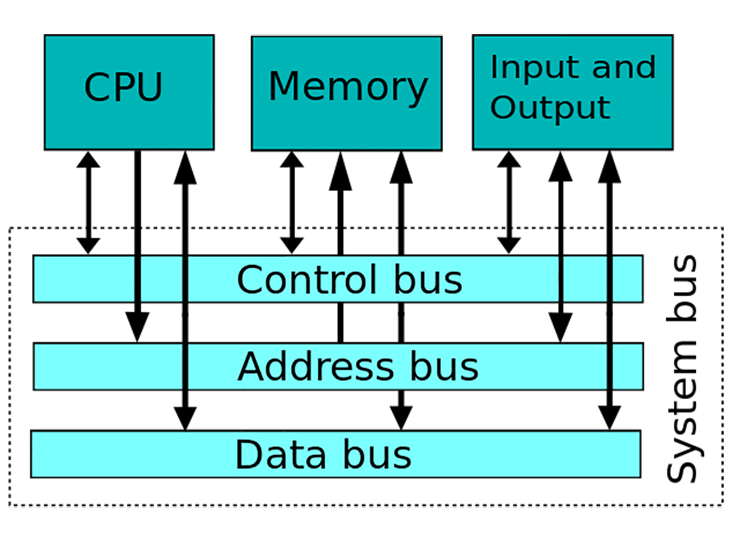
Types of buses (detailed)
- Data bus: carries the actual data. Usually bi-directional (data can go both ways). Bus width can be 8, 16, 32, 64 bits — wider bus = more data per transfer.
- Address bus: carries addresses. It tells memory where to read or write data. Usually unidirectional (CPU sends addresses out).
- Control bus: carries control signals like READ, WRITE, INTERRUPT, and CLOCK so devices understand what to do and when.
Simple example
Think of a school notice board: it sends messages to everyone. Buses move messages (data and commands) inside the computer so all parts can work together.
Summary Table – CPU Functional Units
| Unit | Short Definition | Main Functions | Practical Example |
|---|---|---|---|
| ALU | Performs math and logic operations | Add, Subtract, Multiply, Divide, AND, OR, NOT, Compare | Calculator addition; password comparison |
| Control Unit (CU) | Manages CPU operations and timing | Fetch, Decode, Execute, Interrupt handling | Principal managing school activities |
| Buses | Move data and signals between parts | Data transfer, Addressing, Control signals | Notice board spreading messages |
Step-by-step Example – How CPU works (simple)
- User types 5 + 3 on the keyboard.
- The instruction goes to memory and CU fetches it.
- CU decodes the instruction: it is an addition.
- CU tells ALU to perform addition. ALU calculates 8.
- Result moves via buses to display or memory.


Comments
Post a Comment