Define Bus Structure. Explain types of buses in a computer system.
Definition of Bus Structure
A Bus, in computer architecture, is a group of electronic paths (collection of wires) that transfers Data, Address, and Control Signals between different components of the computer (like: CPU, Memory, and Input/Output devices).
You can think of it as a digital highway or communication system inside the computer.
- Sharing: Bus is a shared transmission medium, meaning CPU, Memory, and I/O Devices all use this same path to talk to each other.
- Purpose: Its main job is to ensure that all parts of the computer share information at the right time and in the right way.
- System Bus: The group of these three main buses (Data, Address, and Control) is called System Bus, which connects CPU to Memory and I/O Devices.
Types of Buses in a Computer System
The system bus is mainly divided into three functional categories:
1. Data Bus

[Image of Data Bus]
| Definition | Function | Direction |
|---|---|---|
| This is the bus that carries actual data and instructions. | It does data transfer between CPU and Memory/I/O Devices. | Bidirectional: Data can go from CPU to Memory (Write) and from Memory to CPU (Read). |
| Bus Width: The width of the data bus tells how many bits (like: 8, 16, 32, 64) it can transfer at once. | The wider it is, the faster the data transfer speed. | This directly affects the system's performance. |
Example: When you read a file from memory, that file's data reaches the CPU through this bus.
2. Address Bus

[Image of Address Bus]
| Definition | Function | Direction |
|---|---|---|
| This is the bus that carries memory location addresses or I/O port addresses. | It tells the CPU where to read data from in memory or where to write data. | Unidirectional: Address always goes from CPU to Memory or I/O Device. |
| Bus Width: The width of the address bus decides how much maximum memory the CPU can access. | If the address bus is N bits, the CPU can address 2^N memory locations. | For example, a 32-bit address bus can address 2^32 (about 4 GB) memory. |
Example: If the CPU needs to know where "File X" is stored in memory, it sends that location's address on this bus.
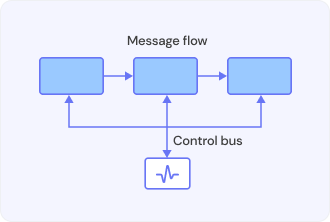
3. Control Bus
[Image of Control Bus]
| Definition | Function | Direction |
|---|---|---|
| This is the bus that carries control signals, which manage and synchronize all operations. | It ensures that all components work at the right time and there is no conflict. | Bidirectional: It includes commands from CPU to components (like: Read, Write) and status signals from components to CPU (like: Interrupt). |
| Examples of Control Signals | Functionality |
|---|---|
| Memory Read/Write | Tells if the CPU will read or write data. |
| Clock Signal | Provides timing to all operations. |
| Bus Request/Grant | This signal is sent when a device wants to use the bus. |
Other Types of Buses
Besides these three main types, buses can also be divided based on their location or function:
- System Bus (Internal Bus):
- It connects important internal components like CPU, Main Memory (RAM), and Cache.
- Data Bus, Address Bus, and Control Bus together make the System Bus.
- Expansion Bus (External Bus/I/O Bus):
- It connects peripheral devices (like: Graphics Card, Sound Card, USB Ports) to CPU and Memory.
- Examples: PCI Express (PCIe), USB, SATA, etc.
You can get more information about these different buses in computer architecture from this video: L-1.4:Types of Buses (Address, Data and Control) in Computer Organization and Architecture.
[Video Thumbnail for Bus Structure]
Extra Information: Importance and Use of Bus Structure
Bus Structure determines the computer's efficiency. It ensures that data is transferred quickly and all components work together. If you need more details, like real-world examples or comparisons, let me know!


Comments
Post a Comment